How to Write a Good Press Release and Get Noticed
Learn how to write a good press release that gets media coverage. Our guide offers expert tips, proven formats, and real-world examples to boost your brand.
Email deliverability isn’t just about good copy—it’s about history. Warm-up tools simulate safe sending patterns, build reputation, and keep your campaigns out of spam while giving you clear data on where your emails actually land.


Cold domain, uneven sending volume, a couple of complaints. Sometimes, that’s all it takes for email service providers to treat your mail like a liability. Not because the copy is bad, but because your sending history isn't as convincing.
That’s where email warmup tools step in. They pace volume, stage authentic interactions, and run placement checks for inboxes so your domain starts looking predictable and safe. Some tools are lightweight safety rails, others are recovery kits for damaged domains, and a few bundle outreach so you don’t have to switch between platforms.
Below is a deliberate, use-case-first shortlist of ten options—what each does well, when to use it, and what to avoid if you value your inbox more than vanity volume.
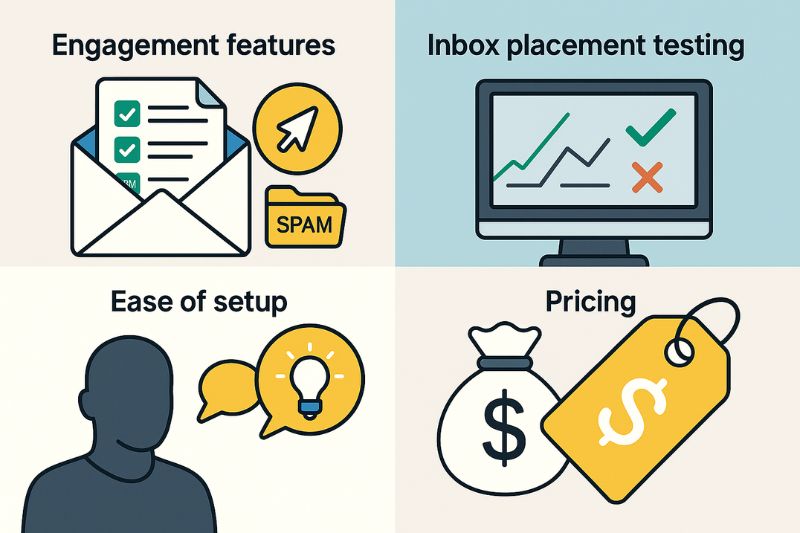
So how did we pick the best of the best warm-up tools available today? First, we looked at the type of engagement each tool provides, from simple opens and replies to advanced actions like link clicks and spam removal. We then checked whether tools offered reliable (or any) inbox placement testing, because deliverability without stats boils down to guessing.
Two other important aspects are ease of setup and pricing. Is there a solid knowledge base or guided onboarding, and which one will give you the best bang for buck if you’re running multiple accounts or working as an agency that has to manage clients and their expectations?
Finally, what’s the overall fit? Some tools are better at repairing reputations, others at prevention, and some work as full outreach suites.
With each of these factors, the point is clarity: which tool is best for your setup and needs.

InboxAlly doesn’t just “open” emails; it behaves like a human audience. It clicks links, replies, moves messages out of spam, and scrolls through long content, and it's the kind of activity that steadies new or questionable sending histories.
It also comes with a seed list that helps verify where messages land, as well as an AI content check to catch spammy phrasing before launch. The warm-up planner sets a proper ramp-up plan based on your volume and goals, so you’re not accidentally warming up your way into a blocklist.
Key features:
Best for: Anyone looking to restore or protect reputation with authentic engagement patterns.
If reputation is wobbling across ESPs, use the best engagement simulation and seed reports you can get today. Get started with InboxAlly for free and ship campaigns that land in the primary inbox.

Lemwarm integrates directly into Lemlist, keeping your sales sequences and warm-up in the same workflow. Besides volume ramp-up, it also runs ESP placement tests so you see primary vs. promotions vs. spam before a campaign goes live. Onboarding is straightforward with clear docs and campaign strategies, and the per-mailbox pricing keeps scaling predictable for growing teams.
Key features:
Best for: Sales organizations that want warm-up and outreach in one ecosystem without switching platforms.

Instantly lets you run cold outreach and warm-up in one place. Build sequences, send at scale, and watch inbox placement in a clean dashboard. Higher tiers allow unlimited inboxes, so adding domains or seats is easy. Setup is quick, credits are generous, and you won’t juggle extra tools. If you’re growing fast and want simple guardrails on deliverability, this is a great start.
Best for: Startups and small teams that want one tool for sending and deliverability

Warmy.io uses its Adeline engine to tailor warm-up to the campaign itself. You can include the exact templates you plan to send, so providers “learn” your real copy instead of generic content. Agencies can set language and topic per client or market, then ship results under their own brand with white-labeling. It’s built for teams that need control without manual tinkering on every account.
Key features:
Best for: Agencies managing diverse clients that need template-driven and multi-language warm-up without requiring additional tools.

MailReach combines warm-up with proactive diagnostics, ensuring technical issues are caught early. Its AI Deliverability Assistant checks your SPF, DKIM, and DMARC setup, highlighting fixes before they cause deliverability failures. The tool also monitors blacklists and runs spam tests, so you always know where your domain stands. While pricing is higher than simpler platforms, its hands-off automation saves time and reduces risk.
Best for: Marketers who want a diagnostic-first solution that automates reputation management.

WarmUp Inbox runs on a 30,000+ mailbox network, but its best value is precision. Its ESP Warmup lets you target Gmail, Outlook, or Yahoo separately, so you can address a specific provider based on what your audience is using. Setup takes minutes, and you can preview placement before you ramp up volume. It also includes practical utilities like DMARC/SPF helpers and a spam check, and a simple sequence builder if you’d rather keep outreach and warm-up in one place.
Best for: Senders who need granular control over reputation with individual inbox providers.

Mailivery is for senders who want more control over how warming unfolds. Instead of relying on fixed defaults, you can set timing, volumes, time zones, and even weekend sending. Its peer-to-peer network creates authentic interactions, and the dashboard surfaces spam rate and account health in real time. Blacklist monitoring adds a bit of safety so issues don’t snowball.
Best for: Power users who need fine-grained customization to match specific workflows.

Warmbox is built for senders who want total control. You can adjust everything from volume ramps, reply rate, audience, and schedule instead of accepting presets. Its 35,000-inbox network interacts with GPT-4–generated messages, so patterns don’t look copy-pasted. It also includes auto-removal from spam, spam-score tracking, and a live email checker to verify setup before you scale. While its pricing can get confusing, the configurability still makes Warmbox a great choice..
Best for: Senders who want maximum control over warm-up with advanced automation.

Mailflow keeps things simple: warm-up without layers of settings. Setup takes minutes, and the free tier lets you test things before commiting. It covers the essentials like automatic warm-up, blacklist watch, and SPF/DKIM visibility so a single-seat or small team can keep reputation steady without a ton of setup. It lacks deep diagnostics and complex reporting, but that’s the trade-off you make for speed and simplicity.
Best for: Solopreneurs and small teams that want a cost-effective warm-up without overengineering.

GMass is for Gmail-first senders who want warm-up without leaving Google’s ecosystem. It runs natively inside Gmail, so setup is quick and daily use feels familiar. Beyond warming, it cleans your lists (dedupes, removes dead addresses), so bounce risk is lower before you start sending. You can also check placement to see if campaigns land where they should. The biggest draw is the price: it’s one of the cheapest ways to keep a Gmail-based program out of trouble.
Best for: Gmail users who want a low-cost, lightweight warm-up with basic hygiene built in.
Inbox placement is fragile, and it doesn’t take much to tarnish your reputation. Warm-up tools are how senders buy themselves breathing room. They don’t guarantee perfect results, but they create the conditions where good campaigns have a chance to be seen.
Among the options, InboxAlly stands out, not because it promises magic, but because it treats deliverability as more than numbers on a dashboard. Super easy to use: connect an inbox, run a seed-list test, set your ramp, and see where messages land, before you ship a campaign. Start your free 10-day trial here.
Learn how to write a good press release that gets media coverage. Our guide offers expert tips, proven formats, and real-world examples to boost your brand.

Learn how to write a press release that attracts attention. Our guide on how to write a press release helps you craft effective, newsworthy announcements.

The future of PR isn't just about being seen by humans—it's about being referenced by AI.