
Media Room Theme Editor: Brand Your Newsroom in Real Time
Choose a theme, switch light and dark mode, and set your colors and header live in the new Press Ranger media room branding editor.
Posted on March 15, 2026
Launches

steve
Every company on Press Ranger can have a public media room: one page with your press releases, press contacts, logo, and social links, so journalists never have to email you for assets. Now you can make it look like your brand. The new branding editor lets you choose a theme, switch between light and dark mode, and set your colors in real time. It's live for every media room.
What's new
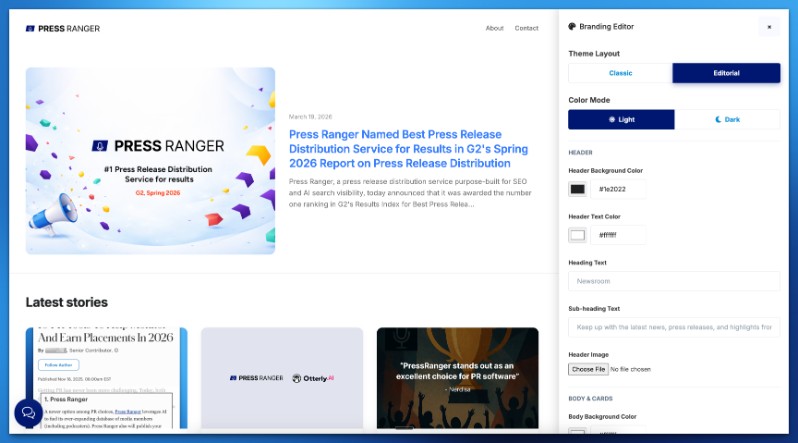
- Two themes. Choose Classic, with a sidebar, or the new Editorial layout. Switch anytime with a live preview.
- Light and dark mode. One click switches modes and fills in sensible default colors.
- Your colors. Set the header background and text, body background, text, links, card backgrounds, and card borders.
- Your header. Write your own heading and subheading, and upload a header image.
- Reset anytime. One click restores the defaults.
Easier to find
Public media rooms are now indexed by Google automatically, which makes them easier to find in organic and AI search. Over time a media room becomes its own SEO driver: a page on your brand that collects every release you publish through our press release distribution.
On your domain
The editor works with white-label domains. Put your media room on your own subdomain, like news.yourcompany.com, brand it, and it reads as your newsroom, not ours. Agencies get one branded media room per client, since every company on the account has its own.
Where to find it
Go to Your Companies, open a company's media room, and click "Customize Branding." Your company has to be public for its media room to be visible. The Media Rooms guide covers setup, custom domains, RSS, and translations, and the release notes are in the changelog.


Sign up for New Feature Friday
We ship a new feature every week, and tell you about it in a snarky Friday email. Covering the intersection of PR, Brand, and AI Search.