Pitch Requests
What are Pitch Requests?
Pitch requests are public calls from journalists looking for sources, quotes, and expert commentary for stories they are working on. Responding to a pitch request is one of the fastest ways to get media coverage because the journalist is already writing the story and actively looking for someone like you.
Press Ranger aggregates pitch requests from multiple platforms into a single searchable dashboard. You can browse, filter, and respond to requests at pressranger.com/pitch-requests.
Sources
Press Ranger pulls pitch requests from the following platforms:
- HARO (Help a Reporter Out) - The original pitch request platform, running since 2008.
- Hero / SOS (Source of Sources) - Founded by Peter Shankman, the original creator of HARO. The leading pitch request platform since HARO's shutdown in December 2024.
- Featured - A pitch request platform with a generous free plan.
- X (Twitter) - Requests posted with the #journorequest hashtag.
- Press Ranger - Pitch requests submitted by other Press Ranger users.
Search and Filters
The pitch request dashboard includes a filter sidebar with the following options:
- Search term - Live search across pitch request content. Results update as you type.
- Source - Filter by one or more sources (HARO, Hero / SOS, Featured, X, Press Ranger). Leave empty to show all.
- Sort by - Order results by "Nearest deadline" (default) or "Furthest deadline."
- Domain Authority - Use the range slider to filter by the requesting outlet's domain authority score (0 to 100). Higher scores indicate more authoritative sites.
Click "Apply filters" to run your search. Click "Clear all filters" to reset.
Pitch Request Cards
Each pitch request shows:
- Journalist name and outlet - Who is requesting and where the story will be published
- Posted date - When the request was submitted
- Category - The topic area of the request
- Source - Which platform the request came from
- Domain Authority - The authority score of the outlet
- Summary - A short headline describing what the journalist needs
- Query - The full details of the request (truncated in the list, full text on the detail page)
- Deadline - A countdown showing how much time you have left to respond
- Pinned - Some requests are pinned to the top of results
Actions
From the pitch request list, you can:
- View - Click through to the full pitch request detail page.
- Set a status - Assign a CRM status to track your progress (e.g. Researching, Contacted, Pitched).
- Not a fit - Hide the request from your feed if it is not relevant.
Creating Your Own Pitch Request
You can also submit your own pitch request for other Press Ranger users to see. Click "Create pitch request" from the top of the Pitch Requests page.
Pitch Notifications
Pitch notifications let you receive email alerts when new pitch requests match a keyword you care about. This way you do not have to check the dashboard manually.
Setting Up a Notification
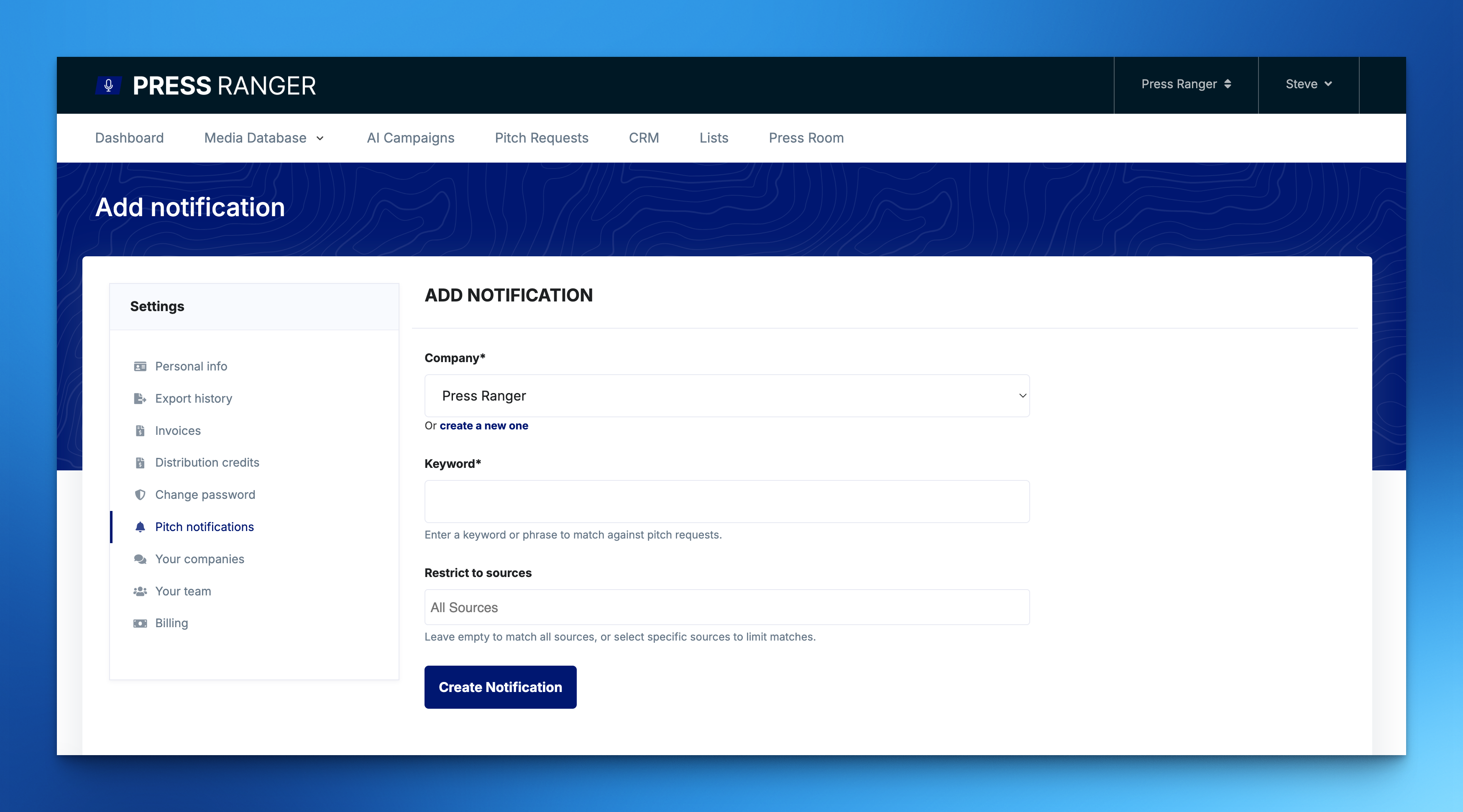
- Click "Pitch notifications" from the Pitch Requests page header, or go to your account settings.
- Click "Add pitch notification."
- Select the company this notification applies to.
- Enter a keyword or phrase to match against incoming pitch requests. Examples: "AI," "travel," "finance," or publisher names like "Forbes."
- Choose a matching strategy:
- Character-based matching (default) - Matches your keyword within words (e.g. "tech" matches "technology").
- Whole word matching - Only matches complete words (e.g. "tech" does not match "technology").
- Optionally select specific sources to limit which platforms trigger the notification. Leave empty to match all sources.
- Click "Create Notification."
Managing Notifications
From the Pitch Notifications page you can:
- Edit - Update the keyword, matching strategy, company, or sources for an existing notification.
- Delete - Remove a notification you no longer need.
Each notification shows the keyword, associated company, and creation date.
Quick Create from Search
When you search for a term on the Pitch Requests page, a "Create notification" link appears in the results header. This pre-fills the keyword and source filters from your current search, so you can set up a notification in one click.
Tips
- Respond quickly. Journalists work on tight deadlines. Aim to respond within 24 hours of the pitch request being posted.
- Be selective. Focus on requests that align closely with your expertise. A well-targeted response beats a generic one.
- Use Domain Authority as a filter. If you want coverage in high-authority outlets, set the DA slider to 40+ to focus on established publications.
- Set a CRM status on requests you respond to so you can track outcomes in your CRM.
- Set up notifications for your core topics so you never miss a relevant request.